What Is a Pizza Prep Station Display System?
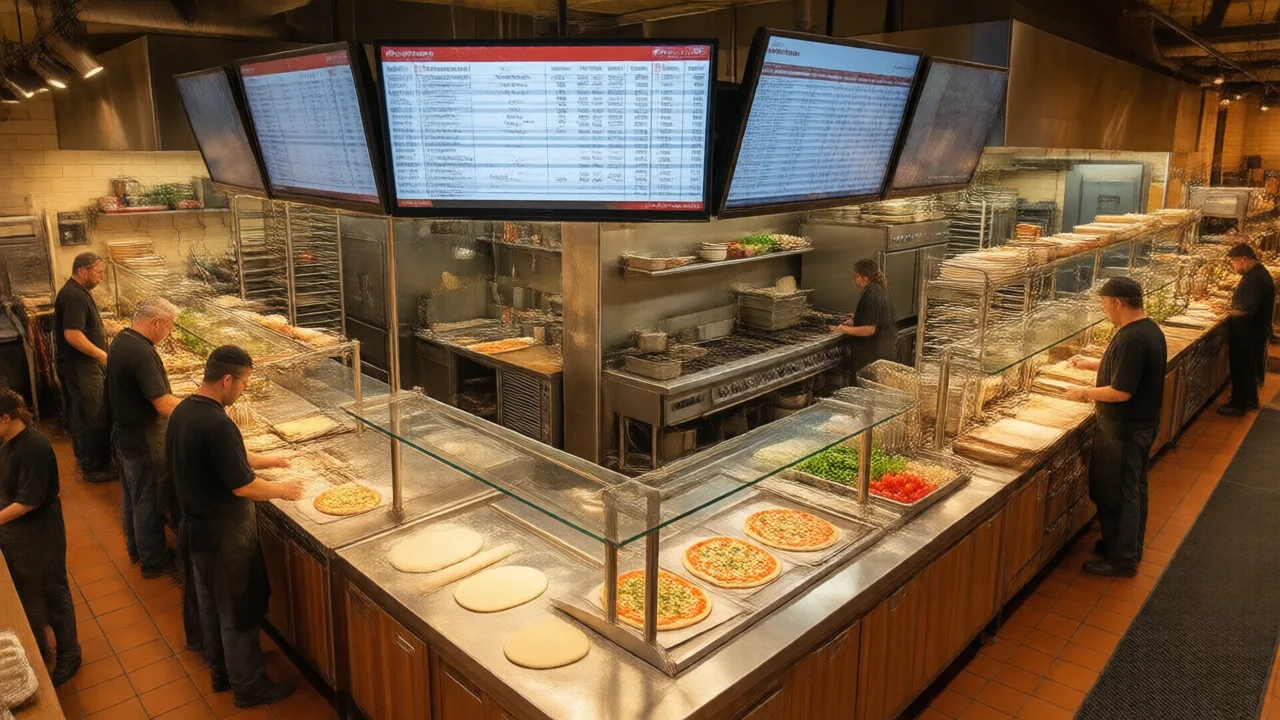
Walk into two pizzerias doing the same $9,000 Friday. In the first, a single printer near the oven chatters out one long ticket per order, a cook tears it off, squints at the modifiers, calls "extra pep, no onion" across the make line, and clips the paper to a rail that's already three deep. In the second, the make line, the oven, and the cut station each have a screen, every screen shows only the items that station touches, and the tickets move themselves down the line as each step finishes.
Same volume, same crew size, completely different night. That difference is what a prep station display system does — and if you've never seen one run well, it's easy to underestimate how much of your rush-hour chaos is actually a routing problem, not a speed problem.
The Definition, Expanded
A pizza prep station display system is a network of digital screens, one at each production station, that receive orders directly from your point-of-sale software and show each station exactly the work it owns. Where a paper setup produces a single ticket that one person has to read, interpret, and physically carry, a display system takes the same order and splits it by station and by timing: the make line sees the dough-and-topping work, the oven sees what's baking and when, and the cut/box station sees only pies that are actually coming out hot.
The key word is routing. The system isn't just a screen instead of a printer — it's a set of rules that decide which parts of an order appear where, in what order, and when. Get those rules right and the line stops depending on someone shouting over the mixer. This is a close cousin of a general pizza kitchen display system, but purpose-built for the multi-station, oven-gated flow that makes pizza different from plated food.
How It Actually Works, Step by Step
Here's the path a single order takes from the moment it's rung in:
- Order enters the POS. A cashier, an online order, a phone order, or a marketplace order all land in the same place.
- The system splits it by station. Toppings and build instructions go to the make line screen; bake timing goes to the oven screen; cut, box, and label instructions go to the cut station screen.
- The make line builds and bumps. As each pie is assembled, the maker taps or presses "bump," which advances that item to the next station's view.
- The oven station manages timing. The oven screen shows what's in, what's due, and what's next, so nothing sits or burns because a paper ticket got buried.
- The cut station finishes and closes. Only baked items appear here, matched to their box, their sides, and their order label for pickup, delivery, or dine-in.
The order lives as one record the whole time — it's just displayed in the pieces each station needs. That's the mechanism behind why the good version feels calm: nobody is holding the whole ticket in their head. If you want to go deeper on the logic that decides what shows where, our primer on make-line routing covers the rules layer in detail.
Why Pizza Needs Its Own Version
You might wonder why a pizzeria can't just use the same display any diner or grill uses. The answer is in how pizza is produced. A typical line kitchen plates most of an order at roughly the same moment, so one screen showing the full ticket to one cook works fine. Pizza is sequential and oven-gated: build, bake, cut, box — with a hard, non-negotiable delay in the middle while the oven does its job.
That delay is exactly where paper systems fail. A ticket clipped to a rail doesn't know a pie is 90 seconds from done. It doesn't reorder itself when a rush comes in. And it can't show the cut station "these three are coming out now" while hiding the twelve still waiting to be built. A prep station display system is designed around that oven gate, which is why generic KDS setups so often feel clumsy in a pizzeria even when the hardware is identical.
Real Numbers: One Screen Per Station Beats One Printer
A three-location pizzeria in central Ohio ran a controlled swap at its busiest store over eight weeks — four weeks on the old single-printer setup, four weeks on a three-screen prep station display with station routing, same crew, same menu, same hours.
- Remakes from wrong or misread tickets: down from about 11 per week to 3
- Average ticket time on Friday/Saturday: 17.4 minutes to 14.1 minutes
- "Where's my order?" counter interruptions: roughly halved, because the cut station could see status at a glance
- Food cost from remakes and comped pies: down an estimated $340 per week at the test store
The manager's summary: "The line wasn't slow before. It was disorganized. We were fast people fighting a paper problem."
What It Costs
Pricing has two parts — software and hardware — and neither is as steep as owners expect.
| Component | Typical range | Notes |
|---|---|---|
| Software (per screen) | $20–$50/screen/mo | Usually an add-on to your existing POS plan |
| Commercial display | $300–$700 each | Heat- and grease-rated; brighter and more durable than a consumer TV |
| Tablet + heat-rated mount | $150–$400 each | Common starter path for one or two stations |
| Install / setup | $0–$500 | Many POS vendors include basic configuration |
A lot of pizzerias start small: one screen at the make line and one at the cut station, add the oven screen once the crew is comfortable. The recurring software cost is the part that scales with stations; the hardware is largely a one-time expense. Weighed against a single busy week of remakes and comped pies, most operators find the math works inside the first month or two.
What to Look For When You Choose One
Not every display system routes pizza well. Before you commit, pressure-test these:
- True station routing, not just mirroring. Each screen should show only its station's work, not the whole order copied four times.
- Local-first operation. Tickets should keep routing over your in-store network even if the internet drops. A dark screen mid-rush is the one failure you can't tolerate.
- Oven-aware timing. The system should understand bake time so the cut station sees pies as they're actually finishing, not the moment they're rung in.
- Order-source clarity. Phone, online, and marketplace orders should be visually distinct so nothing gets lost between channels.
- Speed under load. A display that lags at 40 tickets deep is worse than paper. Ask to see it during a real rush, or read how systems compare in our pizzeria POS speed comparison.
- Bump and recall that a busy hand can hit. Big targets, obvious status colors, and an easy way to pull back a bumped ticket when something changes.
For the broader picture of how kitchen displays fit into a full POS-to-kitchen workflow, this kitchen display system guide is a useful companion, and you can see how tightly a display ties into the register and oven flow on the KwickOS kitchen display product page.
Common Mistakes That Waste the Investment
The technology rarely fails. The rollout does. The three patterns I see most:
Mirroring instead of routing. Owners install screens but show the whole order on every one, so the cut station is still reading build instructions it doesn't need. That's paper on a monitor — you paid for routing and didn't turn it on.
Skipping the crew. A make-line cook who wasn't trained will keep glancing at where the printer used to be. Two shifts of side-by-side coaching is the difference between grumbling and "don't take it away."
No offline plan. If your setup is cloud-only and your internet is flaky, you've moved a single point of failure from the printer to the router. Insist on local-first routing.
Is It Worth It for a Smaller Shop?
If you're a one-oven shop doing modest volume with a two-person crew who can see each other and the whole board, paper may genuinely be fine — don't buy complexity you don't need. The break-even shows up when any of these are true: you run multiple stations, you juggle several order channels, your rushes produce remakes, or you're planning a second location where you can't personally stand on the line. At that point a prep station display stops being a gadget and becomes the thing that lets the line run without you in it.
Frequently Asked Questions
What is a pizza prep station display system?
It is a set of digital screens placed at each production station in a pizzeria — the make line, the oven, and the cut or box station — that receive orders directly from the POS and route each ticket to the stations that need it. Instead of one printer spitting a single paper ticket, every station sees exactly the items it is responsible for, in the order they should be made, and can bump each item as it moves down the line.
How is a prep station display different from a regular kitchen display system?
A standard kitchen display system usually shows the whole order on one screen for one cook. A pizza prep station display system splits a single order across multiple screens by station and by timing, so the make line sees the dough and topping work while the cut station only sees pies that are actually coming out of the oven. It is built around the sequential, oven-gated flow of pizza rather than the all-at-once plating of a typical line kitchen.
How much does a pizza prep station display system cost?
Most systems are priced per screen as a software add-on to your POS, commonly 20 to 50 dollars per screen per month, plus the hardware. Commercial-grade displays run 300 to 700 dollars each, though many pizzerias start with one or two screens and a heat-rated tablet mount for well under 1,000 dollars total. The larger cost is usually deciding to run it well, not the equipment itself.
Does a prep station display work when the internet goes down?
It depends on the architecture. A system where the POS and displays talk over your local network keeps routing tickets even if the internet drops, because the traffic never leaves the building. A purely cloud-dependent setup can stall when the connection fails. For a pizzeria, local-first routing with cloud sync is the safer design, because a Friday outage during a rush is exactly when you cannot afford dark screens.
Will a display system slow my make line down?
Only if it is configured badly. A well-set-up display removes steps — no printing, no walking a ticket to the oven, no re-reading smudged handwriting — and shows quantities and modifiers in a consistent place. Crews usually reach paper-equal speed within a week and pass it soon after. Where displays slow people down is when every station is forced to bump items it does not own, or when the screen shows the full order instead of just that station's work.
Route Every Order to the Right Station
KwickOS splits each pizza order across the make line, oven, and cut station automatically, keeps routing local when the internet drops, and shows every crew member only the work they own. Learn more about how KwickOS handles kitchen routing.
See How KwickOS Handles Kitchen Routing →